Git Cheat Sheet

WebTerm Learn · Updated · CC BY 4.0

46 everyday Git commands with examples, on two A4 landscape pages.
The PDF is free and prints as is. No sign-up.

Click a command to open the lesson where you practice it.
A red ! marks a command you cannot undo.

Git Cheat Sheet

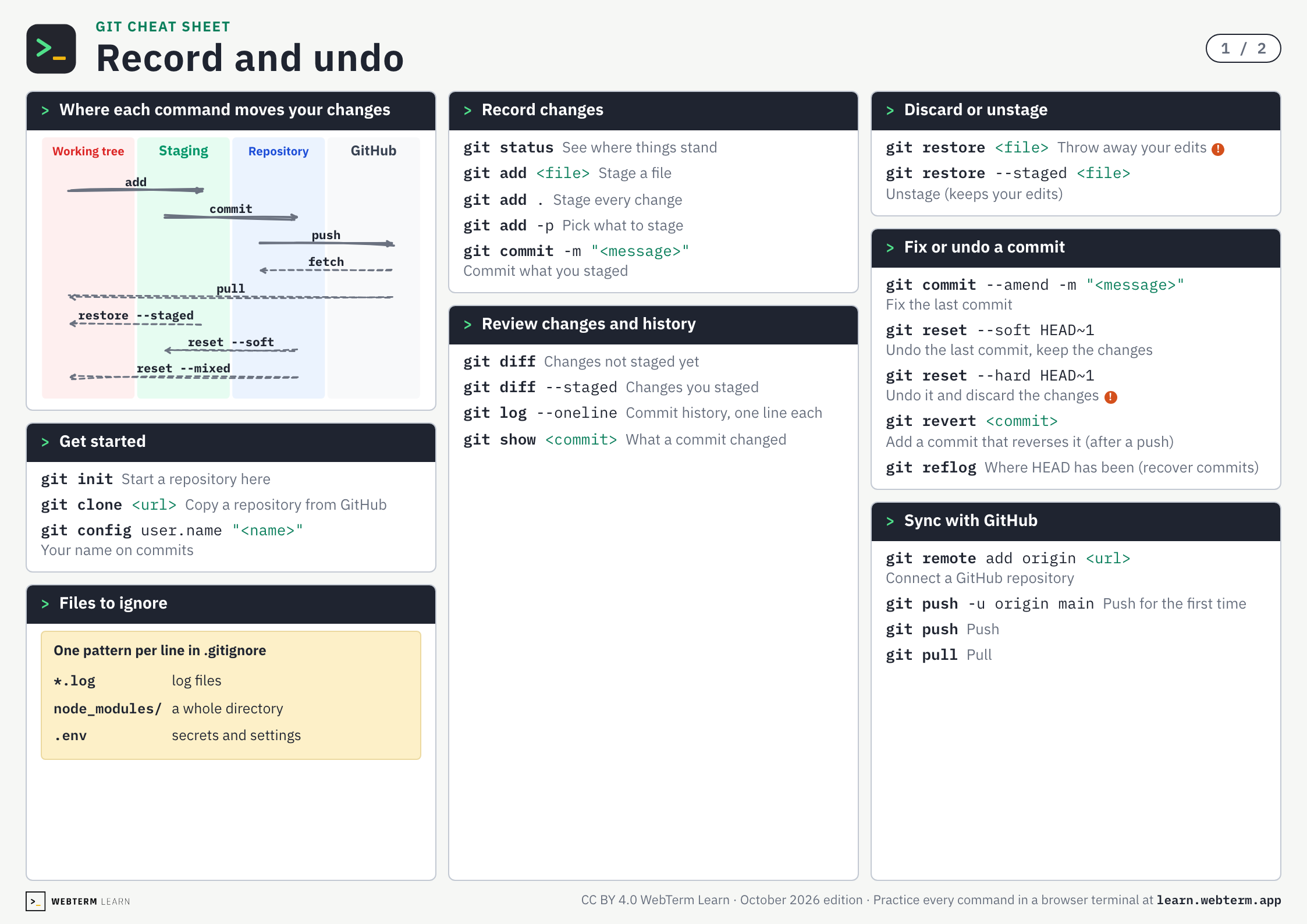
Record and undo

1 / 2

Where each command moves your changesadd, commit, push, pull

Working treeStagingRepositoryGitHubaddcommitpushfetchpullrestore --stagedreset --softreset --mixed

Get startedgit init, git clone, git config

git initStart a repository here
git clone <url>Copy a repository from GitHub
git config user.name "<name>"Your name on commits

Files to ignore.gitignore

One pattern per line in .gitignore
*.loglog files
node_modules/a whole directory
.envsecrets and settings

Record changesgit status, git add, git commit

git statusSee where things stand
git add <file>Stage a file
git add .Stage every change
git add -pPick what to stage
git commit -m "<message>"Commit what you staged

Review changes and historygit diff, git log, git show

git diffChanges not staged yet
git diff --stagedChanges you staged
git log --onelineCommit history, one line each
git show <commit>What a commit changed

Discard or unstagegit restore

git restore <file>Throw away your edits!
git restore --staged <file>Unstage (keeps your edits)

Fix or undo a commitgit commit --amend, git reset, git revert

git reset --soft HEAD~1Undo the last commit, keep the changes
git reset --hard HEAD~1Undo it and discard the changes!
git revert <commit>Add a commit that reverses it (after a push)
git reflogWhere HEAD has been (recover commits)

Sync with GitHubgit remote, git push, git pull

git remote add origin <url>Connect a GitHub repository
git push -u origin mainPush for the first time
WebTerm LearnCC BY 4.0 WebTerm Learn · October 2026 edition · Practice every command in a browser terminal at learn.webterm.app

Git Cheat Sheet

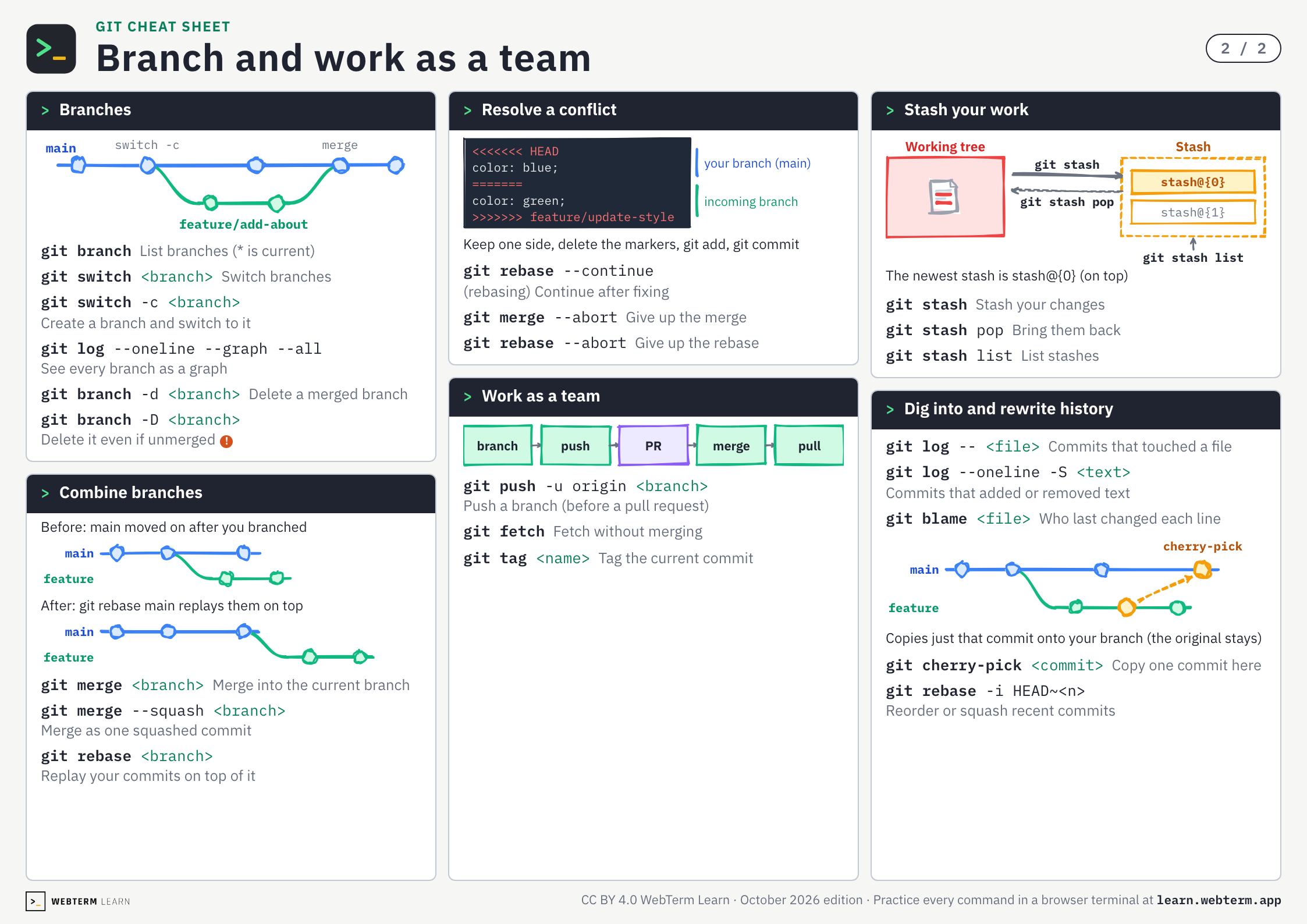
Branch and work as a team

2 / 2

Branchesgit branch, git switch

mainfeature/add-aboutswitch -cmerge
git branchList branches (* is current)
git switch <branch>Switch branches
git switch -c <branch>Create a branch and switch to it
git log --oneline --graph --allSee every branch as a graph
git branch -d <branch>Delete a merged branch
git branch -D <branch>Delete it even if unmerged!

Combine branchesgit merge, git rebase

Before: main moved on after you branchedmainfeatureAfter: git rebase main replays them on topmainfeature
git merge <branch>Merge into the current branch
git merge --squash <branch>Merge as one squashed commit
git rebase <branch>Replay your commits on top of it

Resolve a conflict<<<<<<<, --continue, --abort

<<<<<<< HEAD color: blue;======= color: green;>>>>>>> feature/update-styleyour branch (main)incoming branchKeep one side, delete the markers, git add, git commit
git rebase --continue(rebasing) Continue after fixing
git merge --abortGive up the merge
git rebase --abortGive up the rebase

Work as a teamgit push -u, git fetch, git tag

branchpushPRmergepull
git push -u origin <branch>Push a branch (before a pull request)
git fetchFetch without merging
git tag <name>Tag the current commit

Stash your workgit stash

Working treeStashgit stashgit stash popstash@{0}stash@{1}git stash listThe newest stash is stash@{0} (on top)
git stashStash your changes
git stash popBring them back
git stash listList stashes

Dig into and rewrite historygit log, git blame, git cherry-pick, git rebase -i

git log -- <file>Commits that touched a file
git log --oneline -S <text>Commits that added or removed text
git blame <file>Who last changed each line
mainfeaturecherry-pickCopies just that commit onto your branch (the original stays)
git cherry-pick <commit>Copy one commit here
git rebase -i HEAD~<n>Reorder or squash recent commits
WebTerm LearnCC BY 4.0 WebTerm Learn · October 2026 edition · Practice every command in a browser terminal at learn.webterm.app

Save or share as images

One PNG per page (2246×1588). Post them or drop them into your team docs.

Git cheat sheet, page 1: Record and undo
Open page 1
Git cheat sheet, page 2: Branch and work as a team
Open page 2

FAQ

Is this cheat sheet free?
Yes. There is no sign-up. Download the PDF or the images straight from this page.
I committed by mistake. How do I undo it?
If you have not pushed yet, git reset --soft HEAD~1 undoes the last commit and keeps the changes staged. If you already pushed, use git revert to add a commit that reverses it.
How do I print it?
Download the PDF and print it on A4 paper in landscape orientation. It is 2 pages, one sheet per page.
Can I hand it out in a class or at work?
Yes. It is licensed under CC BY 4.0, so you can share and adapt it as long as you credit WebTerm Learn (learn.webterm.app).
Where can I practice Git?
In the WebTerm Learn Git courses, which you play through like a game, right in your browser. Every command on the sheet links to the lesson that teaches it.
License

CC BY 4.0. Share it, adapt it and use it in classes or training, as long as you credit WebTerm Learn (learn.webterm.app). CC BY 4.0