For working with data yourself
6 chapters · 13 lessonsAbout 1.5 h
SQL Introduction
A free, hands-on SQL course you can run in your browser. Connect to a database that behaves just like PostgreSQL, look around, and pull out exactly the rows you need.
This course continues from Database Introduction
About this course
SQL is the language for fetching the rows you want from a database and changing its data. Whether you build apps or read numbers, it is the same language.
This course uses one small online shop database from the first lesson to the last. Reading the same tables again and again is what makes the shapes stick.
The database in the exercises is a simulation running in your browser, checked byte for byte against real PostgreSQL 17 output. Even the error messages match, so what you learn to read here reads the same at work.
Sample Lessons
Skills you'll learn
Explore a Database Yourself
Connect, see which tables exist, and read their columns and types.
Pull Out Only What You Need
Filter, sort, and limit, so you get exactly the rows you were after.
Change Data Safely
Learn the routine that lets you undo a change you did not mean to make.
Who this course is for
Never Written SQL
Read and write the tables from Database Introduction, now with SQL you write yourself.
Always Asking Someone for the Data
Connect yourself and pull out exactly the rows you need.
Can Write It, but Not Sure
Try the parts people get wrong the most, NULL and joins, and see what actually happens.
Syllabus
6 chapters · 13 lessons
Related Courses
Keys and commands
Connecting to a Database
SELECT * FROM customers;- Every column
psql shop- Connect to the shop database
SELECT and FROM
SELECT stock, name FROM products;- Pick columns
SELECT name AS product, price * stock AS retail_value FROM products;- Rename a column, or calculate one
Filtering Rows
SELECT id, name, stock FROM products WHERE stock < 7;- Filter rows
WHERE city = 'Berlin'- Quote text and dates with '
WHERE signup_date >= '2026-03-01' AND city = 'Berlin'- Both must hold
WHERE status IN ('paid', 'shipped')- Any of these
WHERE name LIKE 'K%'- Starts with K
Missing Values
WHERE phone IS NULL- Rows with no value (NULL)
WHERE phone IS NOT NULL- Rows with a value
WHERE city <> 'Tokyo' OR city IS NULL- Keep the NULL rows too
Sorting and Limiting Rows
ORDER BY price DESC- Sort rows
ORDER BY customer_id, order_date DESC- DESC affects only its column
ORDER BY city NULLS FIRST- NULLs first
ORDER BY stock DESC LIMIT 3- Top 3 by stock
ORDER BY id DESC LIMIT 2 OFFSET 6- Page 4 at 2 rows per page
Aggregating
SELECT round(avg(stock), 1) FROM products;- Count and total
SELECT count(*), count(phone) FROM customers;- count(column) skips NULLs
Grouping Rows
WHERE status <> 'cancelled'- Not equal
SELECT customer_id, count(*) AS order_count FROM orders GROUP BY customer_id;- Group rows
GROUP BY customer_id HAVING count(*) >= 2- Filter after grouping (WHERE filters before)
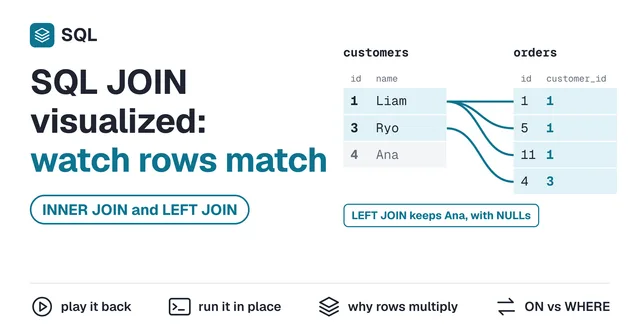
Joining Two Tables
SELECT o.id, o.customer_id, o.order_date, c.name FROM orders o JOIN customers c ON o.customer_id = c.id;- Join tables
SELECT c.id, c.name, count(*) AS order_count FROM customers c JOIN orders o ON o.customer_id = c.id GROUP BY c.id, c.name;- Join, then count per customer
JOIN orders o ON o.id = i.order_id JOIN products p ON p.id = i.product_id- Join three tables
Seeing What Is Not There
FROM customers c LEFT JOIN orders o ON o.customer_id = c.id- Keep rows with no match
WHERE o.id IS NULL- Only rows with no match
SELECT c.id, c.name, count(o.id) AS order_count- Count matches (0 if none)
LEFT JOIN orders o ON o.customer_id = c.id AND o.status = 'paid'- A condition in ON keeps rows with no match
Adding, Updating, and Deleting
INSERT INTO products (name, price, stock) VALUES ('Cable Organizer', 12.00, 0);- Add a row
UPDATE products SET stock = 5 WHERE name = 'USB-C Dock';- Without WHERE, every row changes
SELECT id, name, stock FROM products WHERE name = 'USB-C Dock';- Check the rows with the same WHERE first
DELETE FROM products WHERE name = 'Cable Organizer';- Delete rows
Transactions
BEGIN;- Nothing is final yet
COMMIT;- Make it final
ROLLBACK;- Undo since BEGIN
BEGIN; UPDATE products SET stock = 10 WHERE stock < 5;- Read the count (UPDATE 2), then decide
BEGIN YOUR
JOURNEY
Join thousands of developers who've mastered the terminal. Your first lesson awaits.
Get Started →